



AJDIDL-A SN AJDIDL-A AN positioner board

Specific Adjustment for AJDIDL-AN
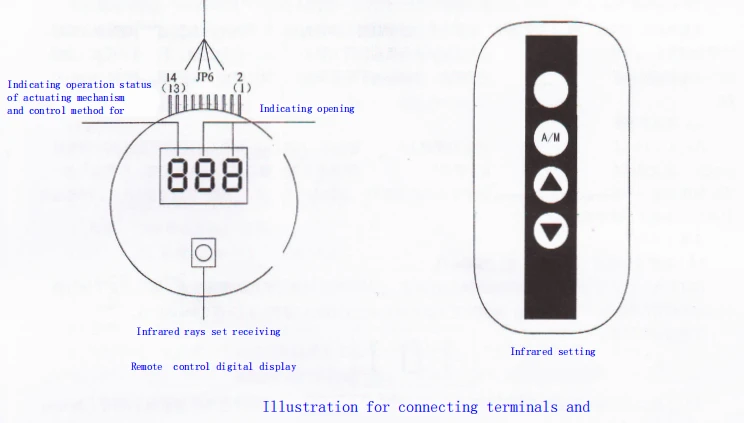
l. Operation on control panel
2. Set the dial switch l on panel to "Manual", "A" would be indicated for nixie tube status indicated, and set the dial switch 2 to "Forward Operation". Press "Increasing" or "Decreasing" Key under the manual status, then the actuating mechanism would run normally, mainly observe the on/off direction, feedback current direction, and check whether the limit switches for totally open and close position are running normally, otherwise the changing the wires are needed.
3. 4-20mA Setting: run the actuating mechanism to the totally close position, turn the feedback potentiometer to set the feedback current as 4 mA (nixie tube indicates "∩ 0" at the very moment), and fix the feedback potentiometer.
4. Press Setting key, waiting until nixie tube indicating "b- -", and then press Setting key for second time with nixie tube indicating "0". Manually operate actuating mechanism to totally open position (indicating "0" in the whole process), then press the Setting key for the third time, and nixie tube indicates "∩00" soon, then setting 4-20mA completed. Input 4-20mA control signal, set the dial switch to "Auto", nixie tube indicates "A", then can implement auto (remote) control.
5. Dead Zone Adjustment (The factory value set is 1.5%, and the adjusting range is 0.5%-5%): the dead zone can be adjusted by pressing "Decreasing" key after "Increasing" key, with zone value increasing or decreasing 0.1% for every pressing, and the the nixie tube indicating the value at the same time. Return to running staus after several seconds.
6. Forward & Backward Action The forward action was adjusted in factory. In case of backward action needed by users, operate as below: adjust as forward action, then adjust the dial switch to "Backward Operation".
7. Use Method of Infrared Remote Controller Setting the on-off dial switch l on panel to Auto, remote controller can be adopted for operation. When the remote controller is set in "Auto", the "Manual-Auto" operation can be selected for dial on control panel. Note: When set the dial switch to "Manual" status, A/M key losses its function, and can only be operated manually. When set the dial switch to "Auto" state, the method for setting 4-20mA with remote controller is same as the above procedures. The "Manual" state was set for dial switch in factory.
Malfunction: Set the dial switch on control panel to "Auto", however, the actuating mechanism can only be adjusted manually, not automatically.
Solution: Check nixie tube display, and set A/M key on remote controller to "A" in case of status indicated as "∩" (manual).


Product Images


Other Control Board & Accessories


certificates

Hot Tags: AJDIDL-A SN AJDIDL-A AN Positioner Control Panel Control Board, China, manufacturers, suppliers, factory, buy, price, quotation


